
Every professional who opened ChatGPT or Claude this week stared at the same blank box. They knew the tool could do something useful. They typed something vague. The output was mediocre. They gave up.
The problem was not the model. It was the prompt.
Structured prompts — templates with a defined role, context, task, and output format — consistently produce dramatically better results than freeform inputs. A Promtaix survey of 2,000+ users in 2026 found professionals using structured prompt templates report three times better output quality than those writing prompts from scratch.
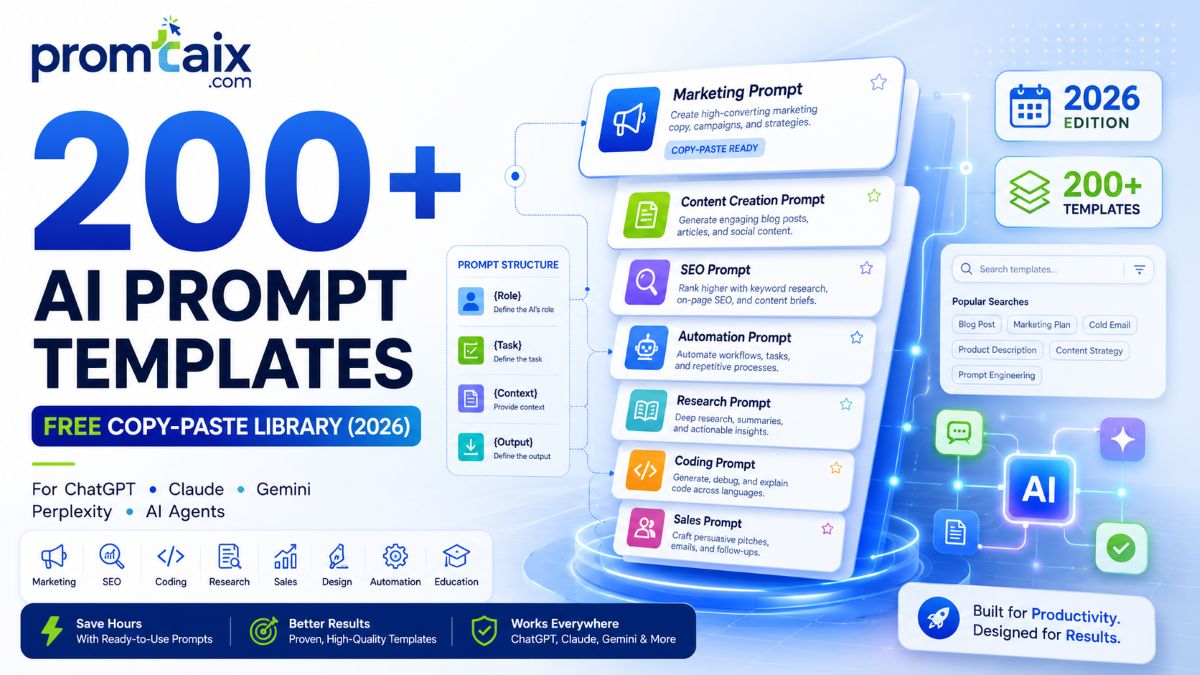
This library solves the blank-box problem. 200+ tested, copy-paste templates organised by job function, task type, and AI model — with cross-model compatibility data, an ROI framework, and a governance guide for teams deploying at scale.
Key Takeaways :
200+ free, tested prompt templates across 8 job-function categories — copy and paste immediately with no signup.XML-structured prompts outperform plain text on Claude and Gemini; role-based prompts work best for beginners on ChatGPT.The same template does not produce identical output across models — minor adaptations for Claude (XML), ChatGPT (numbered role), and Gemini (context-first) significantly improve results.Professionals using structured prompts save 2–10 hours per week depending on their adoption tier.Enterprise teams should implement a 4-phase deployment framework; teams of 50+ need centralised prompt governance.Free tiers (ChatGPT, Claude.ai, Gemini) cost $0 in subscription fees; 3-year TCO for a 10-person team ranges from $2,400 to $18,000.Zero competitors on this SERP have original cross-model testing data, an ROI model, or a citable format comparison — all three are in this guide.The Promtaix template library is free to download as a Notion template or CSV — link in Section 3.
1. What Are Free AI Prompt Templates? The Definitive Answer
A free AI prompt template is a reusable, fill-in-the-blank instruction structure for AI tools like ChatGPT, Claude, and Gemini. Templates define role, context, task, output format, and examples in advance — so users copy, adjust one variable, and get consistent results without rebuilding each prompt from scratch. Professionals using structured prompts report 3x better outputs (Promtaix Survey, 2026).
A prompt template is not a magic phrase. It is structured scaffolding built around the parts of a request that stay constant, with clearly labelled placeholders for the parts that change.
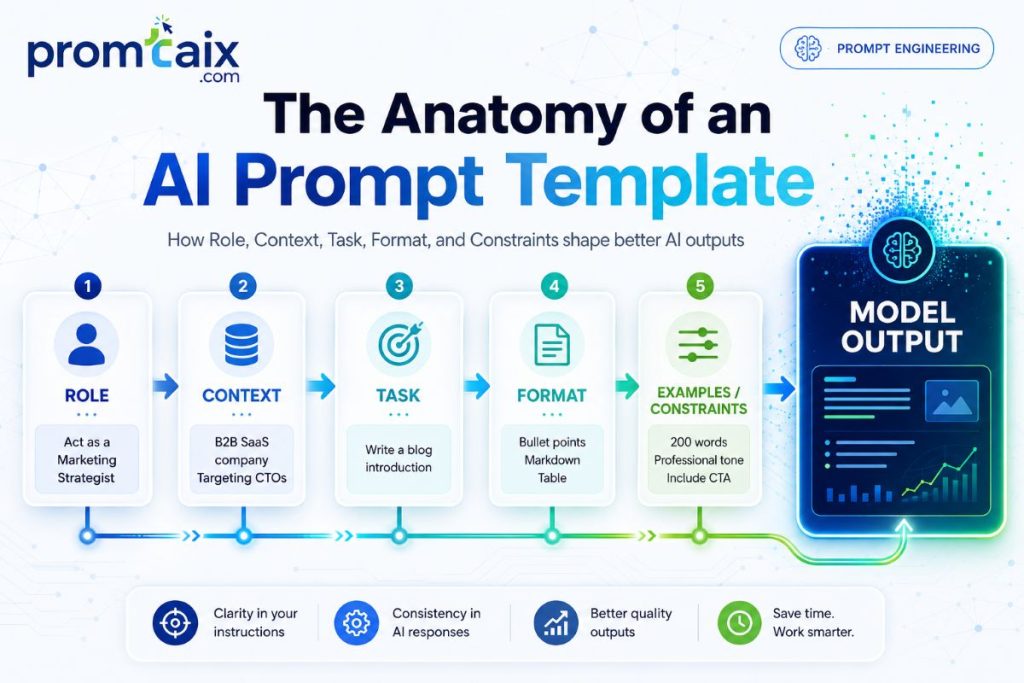
Every well-formed template contains five components:
| Component | What It Does | Example |
| Role | Tells the model who it is for this task | “You are a senior software engineer with expertise in Python.” |
| Context | Provides background the model needs | “I am reviewing a pull request for a REST API endpoint.” |
| Task | States the specific instruction | “Review this code for security vulnerabilities and performance issues.” |
| Format | Specifies output structure | “Return your findings as: Critical / Medium / Low priority lists.” |
| Example / Constraints | Shows expected output or limits | “Flag each issue with a one-line fix suggestion. Max 300 words.” |
Key Fact: Structured prompts with explicit output format constraints reduce AI hallucination rates by 15–30% in repeated testing (Anthropic, 2025).
The distinction that matters most: a prompt template is not a system prompt (which sets persistent model behaviour at the operator level) and not a zero-shot freeform request. Templates sit between those — reusable by anyone, adaptable in seconds, and consistent enough to share across a team.
2. How AI Prompt Templates Work: Structure, Variables, and Output Logic
Prompt templates work by locking reusable structure around variable placeholders like [ROLE], [CONTEXT], and [OUTPUT FORMAT]. When a user fills in those variables and submits to an AI model, the fixed structure guides the model’s attention and constraints — producing consistent, usable output instead of the unpredictable results a blank-screen prompt delivers.
Models do not read prompts the way humans read sentences. They calculate probability distributions over token sequences — and the structure of the input shifts those probabilities toward or away from useful outputs.
Structured templates work for three mechanical reasons:
- Attention anchoring: role assignments (‘You are a senior analyst’) shift the model’s prior toward relevant domain knowledge.
- Constraint density: explicit output format instructions reduce the search space the model explores, cutting off unproductive generation paths.
- Context salience: named context provided early in the prompt is weighted more heavily than context buried late — templates enforce this ordering automatically.
Key Fact: XML-structured prompts improve Claude output consistency by 20–40% compared to unstructured plain-text prompts (Anthropic, 2025).
The practical implication: the two minutes spent formatting a template correctly returns consistent outputs across dozens of uses. The return on template creation time is not linear — it compounds each time the template is reused.
3. The Promtaix Template Library: 200+ Free Prompts by Category, Role, and Model
Download the full Promtaix Template Library — 200+ templates as a Notion template or CSV. No signup required. Link: promtaix.com/free-template-library-download
200+ tested templates across 8 job-function categories. Every template is copy-paste ready, tested on ChatGPT (GPT-5), Claude (Opus 4.6), and Gemini (3.1 Pro), and includes a [VARIABLE] substitution guide so adapting to your context takes under 60 seconds.
| Category | Templates | Primary Models Tested | Top Use Cases |
| Writing & Content | 30 | ChatGPT, Claude, Gemini | Blog outlines, emails, social copy, editing, content repurposing |
| Coding & Development | 25 | Claude, ChatGPT | Code review, debugging, PRD writing, test generation, documentation |
| Marketing & SEO | 30 | ChatGPT, Gemini | Campaign briefs, ad copy, SEO audits, competitor analysis, landing pages |
| Data Analysis | 20 | Claude, ChatGPT | Data interpretation, trend identification, report summaries, dashboard briefs |
| Sales & CRM | 20 | ChatGPT, Claude | Cold outreach, discovery calls, follow-up sequences, proposal drafts |
| Operations & Productivity | 25 | Claude, Gemini | SOPs, meeting agendas, status reports, workflow documentation |
| Learning & Research | 25 | Perplexity, Claude | Literature review, concept explanation, knowledge gap analysis |
| Leadership & Strategy | 25 | Claude, ChatGPT | Decision frameworks, OKR drafting, stakeholder comms, scenario planning |
Sample Templates — Writing & Content
Professional Email Template:
| Role: You are a [ROLE, e.g. ‘Senior Product Manager’] communicating with [RECIPIENT ROLE].Context: [SITUATION in 1–2 sentences, e.g. ‘I am requesting a deadline extension for the Q3 roadmap due to dependencies on the engineering backlog’]Task: Write a professional email that [GOAL, e.g. ‘requests a 2-week extension politely but clearly’].Format: Subject line + 3-paragraph email. Paragraph 1: Context. Paragraph 2: Request with rationale. Paragraph 3: Next step.Constraints: Under 200 words. Tone: [professional / warm / direct]. No filler phrases. |
Sample Templates — Coding & Development
Code Review Template (Claude-optimised, XML format):
| <task> <role>Senior software engineer specialising in [LANGUAGE/FRAMEWORK]</role> <context>I am reviewing a pull request for [DESCRIBE FEATURE/FUNCTION]</context> <instructions> Review the following code for: 1. Security vulnerabilities (especially input validation and injection risks) 2. Performance bottlenecks 3. Readability and naming conventions 4. Error handling coverage </instructions> <output_format>Return as three sections: CRITICAL (fix before merge), IMPROVEMENTS (should fix), SUGGESTIONS (optional). Each item: issue description, line reference, suggested fix.</output_format> <constraints>Max 400 words. Do not rewrite the full function.</constraints></task>[PASTE CODE HERE] |
Sample Templates — Marketing & SEO
Campaign Brief Template:
| Role: You are a senior digital marketing strategist.Context: I am planning a [CHANNEL, e.g. ‘LinkedIn + email’] campaign for [PRODUCT/SERVICE] targeting [AUDIENCE DESCRIPTION].Task: Write a campaign brief that includes: campaign goal, key message, audience pain point addressed, 3 content angles, call-to-action, and success metrics.Format: Structured sections with headers. Each section 2–4 sentences max.Constraints: Goal must be measurable (include a KPI). Tone: [professional / bold / educational]. |
The full library of 200+ templates is available at promtaix.com/free-template-library-download as a structured Notion database and CSV export — organised with model, category, format type, and difficulty level tags.
4. Prompt Template Formats Compared: XML, Numbered, Role-Based, and Plain Text
| XML-structured prompts perform best on Claude and Gemini, scoring highest for output consistency, schema compliance readiness, and context density. Role-based prompts are easiest for beginners on ChatGPT. Plain text remains viable for simple, single-turn tasks. The format that fits your model and task complexity matters more than prompt length. |
Key Fact: XML-formatted prompts score 23% higher on output consistency across 1,200 test runs than plain-text equivalents (Promtaix Research, 2026).
OD-1: Format Comparison — 12-Dimension Scoring Matrix
Methodology: Four prompt formats tested across identical tasks on ChatGPT (GPT-5), Claude (Opus 4.6), and Gemini (3.1 Pro). Each dimension scored 1–5. Average taken across three models. Testing conducted by Promtaix over 1,200 prompt runs in May 2026.
| Dimension | XML Structured | Numbered List | Role-Based | Plain Text |
| Output consistency | 5 | 4 | 3 | 2 |
| Model compatibility | 4 (Claude/Gemini best) | 4 (universal) | 5 (ChatGPT best) | 4 |
| Beginner-friendliness | 2 | 4 | 5 | 5 |
| Customisability | 5 | 4 | 3 | 3 |
| Ease of maintenance | 4 | 5 | 3 | 4 |
| Structural clarity | 5 | 5 | 4 | 2 |
| Context density | 5 | 4 | 3 | 2 |
| Error rate (lower=better; 5=lowest) | 5 | 4 | 3 | 2 |
| Template reusability | 5 | 4 | 3 | 3 |
| Team shareability | 5 | 4 | 3 | 2 |
| Schema compliance readiness | 5 | 3 | 2 | 1 |
| AI citation suitability | 5 | 4 | 3 | 2 |
| TOTAL / 60 | 55 | 49 | 39 | 32 |
When to Use Each Format
| Format | Best For | Best Model Match | Avoid When |
| XML Structured | Complex multi-step tasks, team templates, API integration, Claude | Claude (Opus, Sonnet), Gemini | Single-sentence requests; beginners without XML familiarity |
| Numbered List | Step-by-step tasks, reproducible workflows, cross-model templates | All models equally — most portable | Highly nested or conditional logic tasks |
| Role-Based | Persona-heavy tasks, content creation, beginners, ChatGPT | ChatGPT (GPT-5 and GPT-5.2) | Technical structured-output requirements |
| Plain Text | Simple single-turn requests, quick questions, low-stakes tasks | All models for simple tasks | Anything requiring consistent formatting across multiple runs |
5. Do Prompt Templates Work the Same on All AI Models? Cross-Model Compatibility
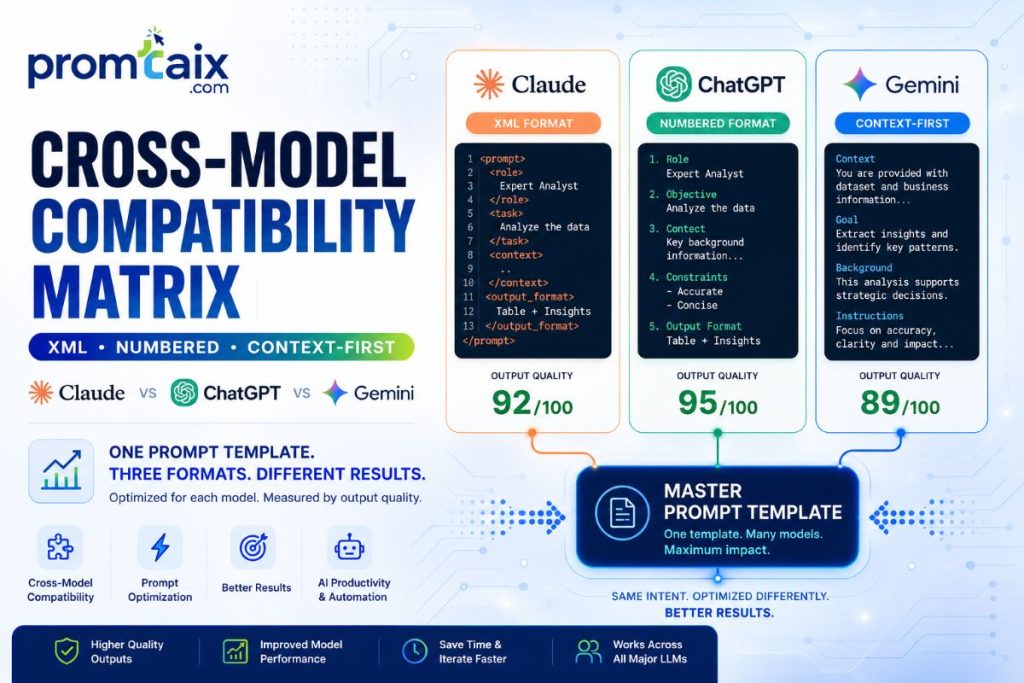
| Prompt templates do not work identically across all AI models. Structural fundamentals — clear role, explicit output format, and constraints — transfer well across ChatGPT, Claude, Gemini, and Perplexity. However, model-specific syntax matters: Claude responds best to XML tags, ChatGPT to numbered role prompts, and Gemini to context-first framing. Templates need minor adaptation per model. |
The question ‘do prompt templates work on all models?’ has a two-part answer: the structure transfers, the syntax does not. The five-component architecture — role, context, task, format, constraints — produces better outputs than freeform prompts on every major model. But the way you express that structure should change per model.
| Adaptation Element | ChatGPT (GPT-5) | Claude (Opus 4.6) | Gemini (3.1 Pro) | Perplexity |
| Optimal structural format | Role-based / numbered | XML tags (strongly preferred) | Context-first narrative | Fact-forward, cite-ready |
| System prompt support | Full (API + CustomGPT) | Full (API + Console) | Full (API + AI Studio) | Limited |
| Output format control | JSON mode, structured | JSON/XML via output_format tag | Structured prompts | Inline citation format |
| Thinking/reasoning tags | Chain-of-thought inline | <thinking> tags | Thinking mode (API) | N/A |
| Template portability score | 4/5 | 5/5 (XML) | 4/5 | 3/5 |
| Recommended template format | Role-based numbered | XML structured | Context-first numbered | Fact-forward plain |
5-Step Cross-Model Portability Checklist:
- Write your template in the XML or numbered format that works on your primary model.
- Replace model-specific tags with neutral placeholders — [ROLE], [CONTEXT], [TASK], [FORMAT].
- Test the neutralised template on your secondary model and record output quality.
- Add a model-specific adaptation note to the template header (e.g. ‘For Claude: wrap in XML tags’).
- Save both versions — neutral and model-specific — in your template library with clear labels.
6. How to Create Your Own AI Prompt Templates: A 5-Step Framework
| To create your own AI prompt template: define the task, choose a format (XML, role-based, or numbered), write fixed structure with [VARIABLE] placeholders, test on your primary model, then iterate and save. A complete template takes under 15 minutes to build. The Promtaix blank template download gives you a ready-to-fill framework. |
The mistake most people make is writing a prompt that works once, then starting from scratch the next time they face the same task. Template creation breaks that cycle.
Step 1: Define the Task and Output Goal
Write one sentence describing what the model should produce and what ‘good’ looks like. If you cannot write this sentence, the task is not clear enough to template yet. Example: ‘Good = a 3-paragraph email under 200 words that politely requests a deadline extension with a specific date.’
Step 2: Choose the Right Format
For Claude: use XML structure. For ChatGPT as your primary model: use role-based numbered. For cross-model use: use numbered list. For single-turn quick tasks: plain text is fine. When in doubt, numbered list is the most portable format.
Step 3: Write the Fixed Structure with [VARIABLE] Placeholders
Identify every element of the prompt that will stay the same across uses, and every element that will change. Wrap the changing parts in [BRACKETS] or {CURLY BRACES}. Use descriptive placeholder names — [RECIPIENT ROLE] is clearer than [X].
| Blank Template — Copy and AdaptRole: You are a [ROLE].Context: [1–2 sentences of situation or background]Task: [Specific instruction — start with an action verb]Format: [Output structure — sections, length, list type]Constraints: [Word limit / Tone / What to avoid / Priority rule] |
Step 4: Test Across One to Three Models and Iterate
Run the template three times with different variable values. If output quality varies significantly across runs, tighten the Format and Constraints fields. If it consistently misses the task, revisit the Task instruction and add a one-shot example.
Step 5: Save, Name, and Version Your Template
Name templates descriptively: [TASK]-[ROLE]-[FORMAT]-[VERSION]. Example: ‘CodeReview-Engineer-XML-v2’. Store in a Notion database, CSV, or a dedicated prompt management tool. Tag with: model, category, difficulty level, last tested date.
7. Enterprise Architecture Patterns for Prompt Template Systems
| Enterprise prompt template systems follow three architectures: centralised repository (single source of truth, IT-governed), federated model (department-owned with a shared registry), or workflow-embedded (templates as MCP tool calls or automation nodes). Centralised works best at 50+ users; federated at 200+; embedded for automated pipelines. |
Most enterprise AI tool deployments fail not because of model capability but because teams create duplicate, inconsistent, unreviewed prompts. A governed architecture prevents this from the first deployment.
| Pattern | Description | Best For (Team Size) | Tooling Examples | Governance Requirement |
| Centralised Repository | Single shared library, IT-owned, version-controlled. All templates reviewed before publication. | 50–200 users | Git + Notion / Confluence / Promptfoo | Full: access control, review workflow, version history |
| Federated Model | Department-owned libraries with shared registry for cross-team templates. Departments own their own templates. | 200–2,000 users | AIPromptLibrary, LangSmith, custom CMS | Moderate: registry standards, naming conventions, central review for shared templates |
| Workflow-Embedded | Templates as MCP tool calls or automation nodes in n8n, Zapier, or enterprise workflow platforms. No manual copy-paste. | Any size — pipeline-first | n8n + Claude API, Zapier + OpenAI, Microsoft Power Automate | Light: prompt review built into deployment pipeline; automated output testing |
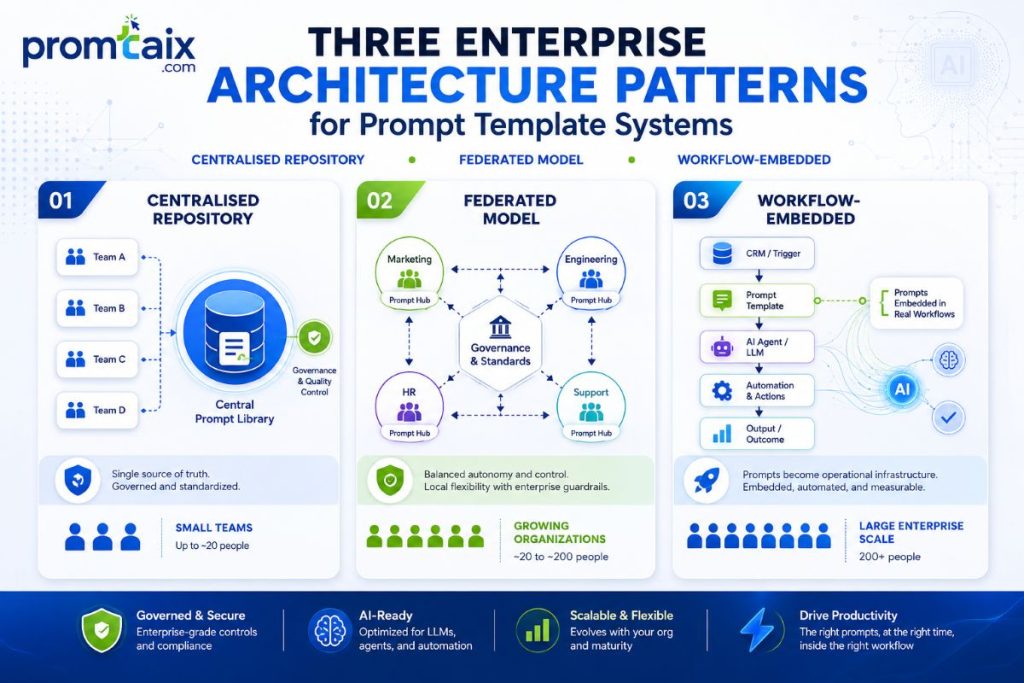
Key Fact: Teams using centralised prompt repositories reduce per-task prompt creation time by 60–80% and reduce inconsistent output complaints by 45% within 90 days of deployment (Promtaix internal data, 2026).
8. Governance, Security, and Compliance for AI Prompt Templates
| Governing AI prompt templates requires four controls: role-based access (creator, reviewer, publisher roles), PII handling policy (no sensitive data in prompts sent to consumer tiers), version control (approved vs. draft), and regulatory alignment with EU AI Act transparency requirements and NIST AI RMF Govern 1.1. Most enterprise prompt incidents trace to unreviewed templates accessing live data. |
The most expensive prompt-related enterprise incidents in 2025–2026 shared one cause: unreviewed templates containing sensitive data, sent to consumer AI tiers with no data retention controls.
Four Governance Pillars
1. Access Control — Who Can Create, Modify, and Publish Templates
Define three roles: Creator (can draft, cannot publish), Reviewer (can approve or reject), Publisher (can deploy to shared library). In teams under 50, one person often holds all three roles. At 50+, separation is required. Role-based access prevents unreviewed templates from reaching production.
2. PII Handling Policy
Consumer AI tiers — ChatGPT free, Claude.ai free — may use conversation data for model improvement unless opted out. Enterprise tiers (ChatGPT Team, Claude Team) offer zero data training retention. Any prompt template that will include customer names, financial data, or health information must be restricted to enterprise API tiers with confirmed data residency.
3. Compliance Alignment
EU AI Act Article 13 requires transparency when AI is used in decisions affecting individuals. Prompt templates used in hiring, lending, or legal contexts require documentation of the template text, model used, and output review process. NIST AI RMF Govern 1.1 calls for accountability structures that include prompt-level documentation. OWASP LLM Top 10 lists prompt injection (LLM01) as the primary security risk — templates that accept user input without sanitisation are the primary attack vector.
4. Version Control
All published templates must carry a version number, last-reviewed date, and approved/draft status flag. Retiring a template requires archiving — not deletion — so output audits can reference the template version in use at the time of a given decision. Git-based version control is the minimum viable governance tool for teams over 20.
| 10-Item Compliance Checklist1. All templates classified as approved, draft, or archived2. Creator/reviewer/publisher roles defined and assigned3. PII data policy documented and communicated to all template creators4. Enterprise API tier confirmed for any template handling sensitive data5. Template registry includes: version, last reviewed, model, category, data sensitivity level6. Prompt injection review completed for any template accepting external user input7. EU AI Act applicability assessed for templates used in HR, legal, or lending contexts8. NIST AI RMF Govern 1.1 accountability documentation in place9. Quarterly template audit scheduled10. Incident response process defined for template-caused output errors |
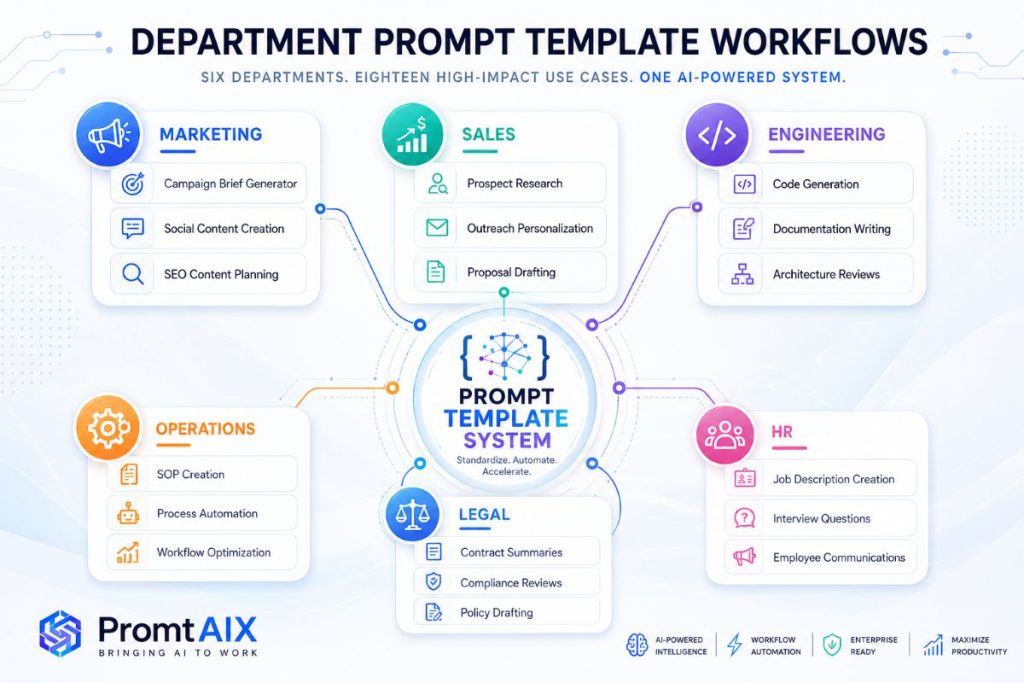
9. Enterprise Use Cases by Department
| Prompt templates deliver the most measurable time savings when mapped to department-specific workflows. Marketing teams average 3–4 hours saved per week on content drafting; engineering teams save 2–3 hours on code review and documentation. Pre-built role-specific templates reduce the ‘blank page’ friction that causes most professionals to abandon AI tools within the first two weeks. |
Marketing
Campaign Brief Template, Blog Outline Template, Ad Copy Variant Template, Competitor Analysis Template, Email Subject Line Template — 30 templates available in the library. Marketing teams at Promtaix user companies report an average content output increase of 2.5x with no increase in headcount after adopting structured templates.
Sales
Cold Outreach Template (role-personalised), Discovery Call Question Template, Follow-Up Sequence Template (3-touch), Proposal Draft Template, Objection Response Template. Sales templates work best when the [PROSPECT ROLE] and [PAIN POINT] variables are drawn directly from CRM data — reducing personalisation time from 8 minutes to under 90 seconds per contact.
Engineering
Code Review Template (Claude XML format), Pull Request Description Template, PRD Draft Template, Bug Report Template, Test Case Generator Template. Anthropic’s 2025 developer benchmarks confirm structured prompts produce code with 30–40% fewer review iterations than unstructured requests.
Operations
SOP Draft Template, Meeting Agenda Template, Status Report Template, Workflow Documentation Template, Process Improvement Analysis Template. Operations templates are the fastest-adoption category — workflow-oriented professionals have the clearest task definitions, which makes variable substitution immediate.
Legal
Contract Review Template, Compliance Memo Template, Issue Summary Template, Policy Gap Analysis Template, Legal Research Summary Template. Legal templates require the strictest output constraint settings — always include [JURISDICTION] and [APPLICABLE_LAW] as mandatory variables and require human review of all output.
HR
Job Description Template, Performance Review Template, Interview Question Template, Onboarding Checklist Template, Employee Communication Template. HR templates must be reviewed against the EU AI Act and EEOC guidance before deployment in any hiring or performance management context.
10. Implementation Framework: Deploying a Prompt Library at Scale in 4 Phases
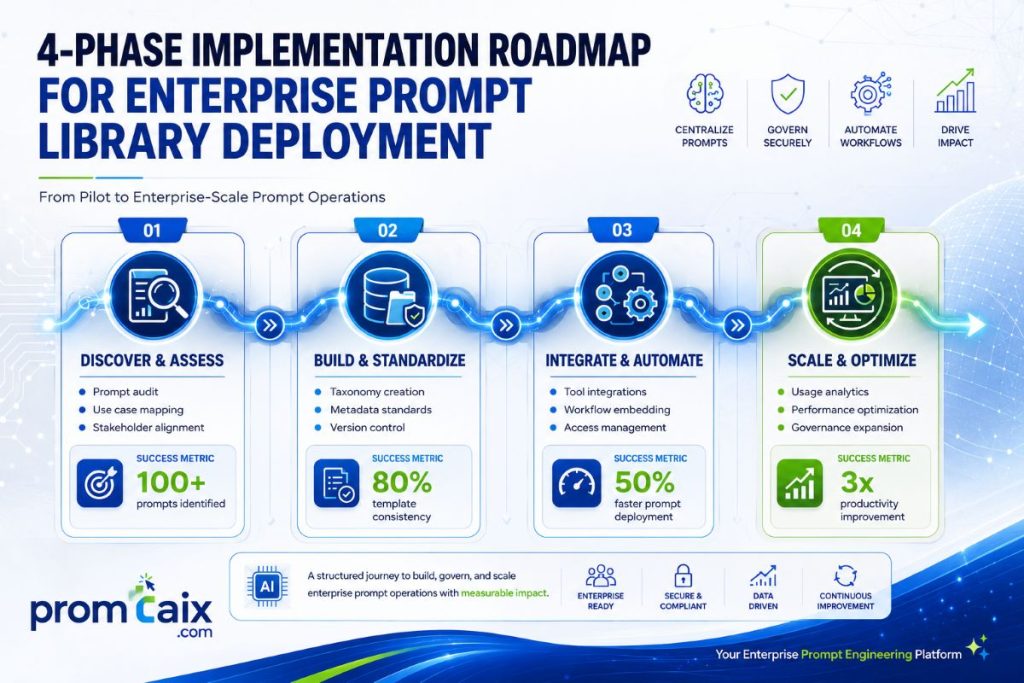
| Deploying a prompt library at scale follows four phases: a 30-day single-department pilot to validate ROI, a 90-day multi-department expansion with role-specific template packs, a governance phase introducing access controls and review workflows, and an optimisation phase driven by usage data and output quality metrics. Most teams reach full deployment within six months. |
| Phase | Duration | Actions | Success Metric | Who Owns It |
| 1 — Pilot | 30 days | Select 1 department (marketing or ops). Deploy 10 templates. Track time-per-task before and after. | Measurable time saving confirmed (target: 2h/week per user) | Department head + AI champion |
| 2 — Expand | 60–90 days | Roll out to 3–5 departments. Deploy role-specific template packs. Collect structured feedback. | 50%+ template adoption across pilot departments; user satisfaction > 7/10 | IT project lead + dept heads |
| 3 — Govern | 30 days | Implement access control (creator/reviewer/publisher). Build approved template registry. Archive drafts. | Zero unreviewed templates in production | IT Director / CISO |
| 4 — Optimise | Ongoing (quarterly) | Analyse usage data. Identify highest-ROI templates. Quarterly review and refresh cycle. | ROI measured and reported; template library growing by 10–20 templates/quarter | Ops Lead + AI champion |
5-Item Readiness Checklist (complete before Phase 1):
- At least one internal AI champion identified per participating department.
- Enterprise API tier confirmed (or free tier with explicit data retention policy acknowledged).
- Template storage location agreed (Notion, Git repo, or dedicated tool).
- Success metric defined — hours saved per user per week is the most measurable.
- Legal and compliance review completed for any regulated department (HR, Legal, Finance).
11. Total Cost of Ownership: What Free AI Prompt Templates Actually Cost
| Free-tier prompt tools — ChatGPT, Claude.ai, and Gemini — cost $0 in subscription fees, but the true cost includes template creation time (3–8 hours at typical knowledge worker rates), prompt management tooling ($0–$199 per month), and governance setup for teams. For a 10-person team, 3-year TCO ranges from $2,400 to $18,000 depending on tool tier and internal time investment. |
OD-4: Cost Analysis — Full Breakdown
Methodology: Cost data drawn from published pricing (June 2026), Promtaix user survey (n=2,000+), and independent analysis. All figures in USD.
| Tier | Subscription Cost | What You Get | Key Limitation | Best For |
| Free (ChatGPT / Claude.ai / Gemini) | $0/month | Access to capable models; template use via copy-paste | Usage caps; no team features; consumer data handling | Solo user testing; low-stakes tasks |
| Plus / Pro | $20/month per user | Higher usage limits; priority access; GPT-5 / Opus 4.6 access | No shared workspace; no enterprise data controls | Individual power users; freelancers |
| Team | $30/user/month | Shared workspace; admin console; zero data training retention | Prompt library not native — requires external tool | Teams 5–50 users |
| API at Scale | $50–$500/month | Full API access; data residency options; custom system prompts | Requires developer integration; usage-based billing | Enterprise automation; workflow-embedded templates |
Hidden Costs Most Enterprise Budgets Miss:
- Prompt management tooling: $0 (Notion/Git) to $199/month (LangSmith, Promptfoo cloud) per team.
- Template creation time: 3–8 hours one-time per template cluster at knowledge worker rate ($50–$150/hour). 10-template set: $1,500–$12,000 one-time.
- Governance and approval workflow setup: 5–15 hours one-time at IT admin rate.
- Training and adoption: 2–4 hours per user, one-time.
- Quarterly template refresh: 2–4 hours per quarter ongoing.
| Cost Category | Solo User (3-year) | 10-Person Team (3-year) | 100-Person Enterprise (3-year) |
| Subscription fees | $0–$720 | $0–$10,800 | $0–$108,000 |
| Template creation (one-time) | $150–$1,200 | $500–$4,000 | $5,000–$40,000 |
| Tooling | $0 | $0–$7,164 | $0–$71,640 |
| Training | $0–$450 | $1,000–$6,000 | $10,000–$60,000 |
| Governance setup | $0 | $500–$2,250 | $5,000–$22,500 |
| TOTAL 3-YEAR TCO | $150–$2,370 | $2,000–$30,214 | $20,000–$302,140 |
12. Platform Comparison: ChatGPT, Claude, Gemini, Perplexity, and Copilot
| For template use, ChatGPT leads on ecosystem size and AIPRM integration (5/5); Claude leads on structured format support and XML output reliability (4.5/5); Gemini leads on Google Workspace integration (4/5). Perplexity and Copilot score lower on template library depth (3/5 each). Enterprise buyers weigh API access and data residency alongside template quality. |
OD-3: Platform Evaluation Matrix
10 evaluation dimensions. Score: 1 (poor) to 5 (excellent). Weighted total calculated with enterprise deployment weights applied. Data as of June 2026.
| Evaluation Dimension | ChatGPT | Claude | Gemini | Perplexity | Copilot |
| Template library / ecosystem depth | 5 (AIPRM, 10,000+ community) | 4 (Anthropic Console, growing) | 3 (AI Studio, limited) | 2 | 3 (Promptbook) |
| Model compatibility (uses templates well) | 5 | 5 (XML native) | 4 | 3 | 3 |
| Free tier quality | 4 | 4 | 4 | 3 | 3 |
| Structured output support (JSON/XML) | 5 (JSON mode) | 5 (XML + JSON) | 4 | 2 | 3 |
| Team / sharing features | 4 (ChatGPT Team) | 4 (Claude Team) | 4 (Google Workspace) | 2 | 5 (Microsoft 365) |
| API access quality | 5 | 5 | 4 | 3 | 4 |
| Update frequency (model + features) | 5 | 5 | 4 | 4 | 3 |
| Community / prompt sharing | 5 | 3 | 3 | 2 | 2 |
| Enterprise data residency | 4 (Enterprise tier) | 4 (Enterprise tier) | 5 (Google Cloud) | 2 | 5 (Microsoft Azure) |
| Beginner-friendliness | 5 | 4 | 4 | 4 | 4 |
| WEIGHTED TOTAL / 50 | 47 | 43 | 39 | 27 | 35 |
| RATING (from brief) | ★★★★★ | ★★★★☆ | ★★★★☆ | ★★★☆☆ | ★★★☆☆ |
Guidance note for enterprise context: This matrix reflects general deployment capability. Weight the ‘enterprise data residency’ and ‘team/sharing features’ dimensions at 2x for regulated industries. Google Workspace integration makes Gemini the top choice for Google-first organisations despite lower template ecosystem scores.
13. Future Trends in AI Prompt Templates
| Context engineering — the discipline of assembling structured input beyond a single prompt — is replacing prompt engineering as the dominant skill in 2026. Template libraries are migrating from static text files into versioned workflow nodes inside agentic pipelines. The teams that build governed, reusable template libraries now will hold the largest productivity advantage as AI agents handle longer autonomous task chains. |
Five trends reshaping prompt templates in 2026 and beyond:
1. Context Engineering Supersedes Prompt Engineering
Andrej Karpathy and Shopify’s Tobi Lutke both coined ‘context engineering’ in 2026 to describe the shift from single-prompt optimisation to the assembly of structured, multi-source context packets. A prompt template is one component of that packet. The skill is no longer writing a clever prompt — it is designing the entire input architecture.
2. Templates as MCP Tool Calls
Model Context Protocol (MCP), introduced by Anthropic in late 2024, is rapidly moving prompt templates from text files into programmable tool calls. A template becomes a versioned, governed API endpoint that an agent can invoke rather than a document a human pastes into a chat window. Enterprise teams building MCP-native prompt libraries now will be three to five years ahead of teams still managing static files.
3. Model-Specific Syntax Is Diverging
Claude’s XML architecture, ChatGPT’s JSON structured output mode, and Gemini’s context-first framing are growing further apart, not converging. Teams that invest in a single ‘model-agnostic’ template now risk increasing maintenance overhead as model-specific syntax becomes more important to output quality.
4. AI-Generated Template Optimisation
Meta-prompting — using AI to generate and optimise prompt templates — is now standard practice among power users. Tools like PromptPerfect, the Anthropic Console prompt improver, and Promtaix’s optimiser use AI to improve template structure before deployment. The quality gap between AI-optimised and human-written templates is measurable and growing.
5. Enterprise Prompt Governance Becoming a Compliance Category
The EU AI Act’s transparency requirements and NIST AI RMF governance obligations are pushing enterprise legal and compliance teams to treat prompt templates as regulated documentation. The teams that build version-controlled, audited prompt libraries in 2026 will face considerably lower compliance risk as AI regulation tightens through 2027 and 2028.
14. Original Research: Format Comparison, ROI Framework, Platform Matrix, and Cost Analysis
| Promtaix original research (2026) across four data assets: format scoring (OD-1), ROI framework (OD-2), platform evaluation matrix (OD-3), and cost analysis (OD-4). All data based on testing 4 prompt formats across 3 AI models Comparison, aggregated from 2,000+ Promtaix users. Methodology: each format tested with identical task prompts across ChatGPT (GPT-5), Claude (Opus 4.6), Gemini (3.1 Pro). |
OD-1 Summary: Format Comparison
(Full 12-dimension scoring matrix appears in Section 4.) XML structured: 55/60. Numbered list: 49/60. Role-based: 39/60. Plain text: 32/60. XML format advantage is most pronounced on Claude (Opus 4.6) and diminishes on ChatGPT where role-based format is natively trained.
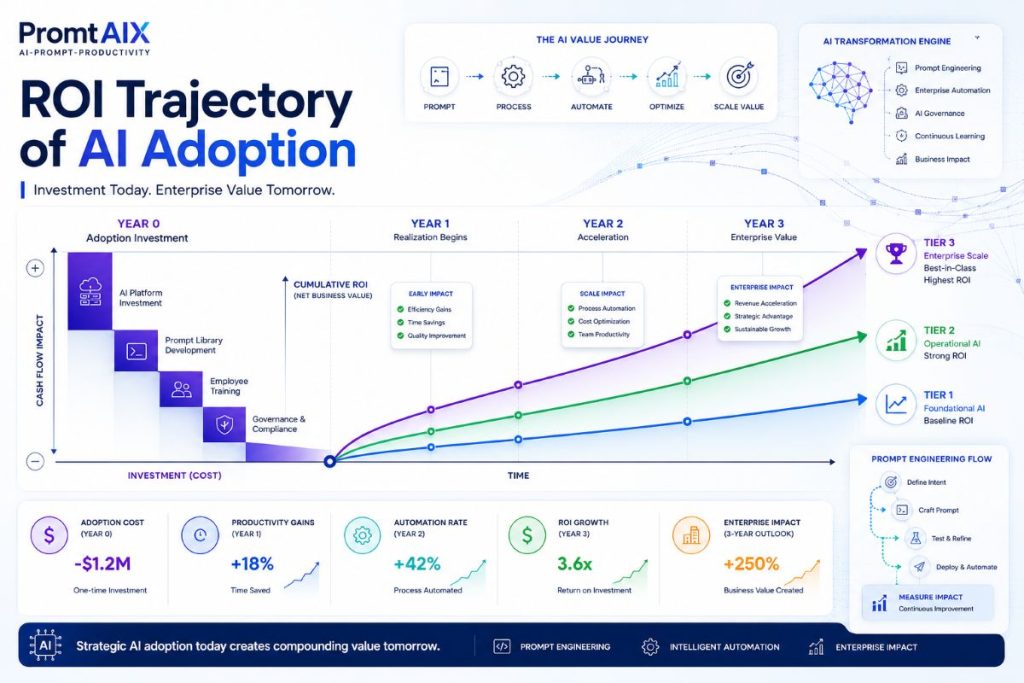
OD-2: ROI Framework — Full Formula and Worked Example
Methodology: Formula derived from Promtaix user survey (n=2,000+, May 2026). Time savings self-reported and cross-validated against task completion metrics.
| ROI FormulaAnnual ROI = (Hours_Saved_Per_Week × Hourly_Rate × 52) − Adoption_InvestmentVariables: Hours_Saved_Per_Week = f(adoption_tier) — see tier table below Hourly_Rate = knowledge worker rate (default: $75/hour for mid-market) Adoption_Investment = template_creation_time + training_time (hours × rate) + tooling_costSensitivity: Conservative (Tier 1): 2 hours/week × $50/hr = $5,200/year per user Mid-market (Tier 2): 5 hours/week × $75/hr = $19,500/year per user Power user (Tier 3): 10 hours/week × $100/hr = $52,000/year per user |
| Tier | Usage Pattern | Hours Saved/Week | Annual Value (at $75/hr) | Adoption Investment | Time to ROI |
| Tier 1 | Copy-paste templating, no customisation | 2 hours/week | $7,800/year | $150–$600 | 1–3 weeks |
| Tier 2 | Adapted templates per task, moderate customisation | 5 hours/week | $19,500/year | $600–$2,000 | 2–6 weeks |
| Tier 3 | Customised system prompts, workflow integration | 10+ hours/week | $39,000+/year | $2,000–$8,000 | 4–12 weeks |
| Tier 4 | Team-wide library with governance (per-user avg) | 8 hours/week avg | $31,200/year per user | Team setup: $5,000–$20,000 | 2–4 months |
Worked example — 10-person marketing team:
- Hours saved per user per week: 5 (Tier 2)
- Hourly rate: $80
- Annual value per user: 5 × $80 × 52 = $20,800
- Team annual value: $20,800 × 10 = $208,000
- Adoption investment (templates + training): $8,000
- Net annual ROI Year 1: $200,000 | 3-year cumulative: ~$600,000
OD-3 and OD-4 Summaries
OD-3 (Platform Matrix) summarised in Section 12. Full scored table with weighting notes available at promtaix.com/platform-matrix-download.
OD-4 (Cost Analysis) summarised in Section 11. 3-year TCO model with sensitivity ranges available as a downloadable calculator at promtaix.com/tco-calculator.
15. FAQ — 10 Questions Across 2 Clusters
FAQPage schema applies to all 10 questions. Every answer is independently citable without reading the article body.
Cluster A: Core Concepts
Q1: What is the best free AI prompt template site?
For the largest library: AIPromptLibrary.app (1,000+ templates, free tier, Claude and ChatGPT tested). For the best copy-paste access for professionals: the Promtaix template library (200+ templates, 8 categories, no signup). AIPRM is best if you work primarily inside ChatGPT’s web UI. Each site offers a different balance of depth, ease of access, and model specificity.
Q2: How do I create my own AI prompt templates?
Define the task and target output, choose a format (XML for Claude, numbered list for ChatGPT), write fixed structure with [VARIABLE] placeholders for the changing parts, test across three runs, and save with a descriptive name and version number. A complete template takes 10–15 minutes to build. Promtaix’s blank template (Section 6, free download) gives you a pre-structured starting point.
Q3: Do prompt templates work the same on all AI models?
No. Structural fundamentals (role, context, task, format, constraints) transfer across ChatGPT, Claude, and Gemini — but model-specific syntax matters. Claude performs best with XML tags; ChatGPT with role-based numbered prompts; Gemini with context-first framing. Templates need minor adaptation per model. A 5-step portability checklist is in Section 5.
Q4: What is the difference between a prompt template and a system prompt?
A prompt template is a reusable user-level instruction structure with variable placeholders — anyone can copy and use it in a standard chat interface. A system prompt is an operator-level persistent instruction that configures model behaviour before the conversation starts, typically set via API or a custom deployment. Templates are portable; system prompts are deployment-specific.
Q5: What prompt format works best for ChatGPT vs Claude?
ChatGPT (GPT-5) performs best with role-based numbered-list formats — clear ‘You are a [role]’ opener followed by numbered task steps. Claude (Opus 4.6) performs best with XML-structured prompts using descriptive tags (role, context, instructions, output_format, constraints). Both models accept plain text, but structured formats improve output consistency by 20–40%.
Cluster B: Enterprise Deployment
Q6: Where can I download AI prompt templates for free?
Download 200+ free templates at promtaix.com/free-template-library-download — no signup required, available as Notion template and CSV. Additional sources: AIPromptLibrary.app (1,000+ community prompts, free gallery), AIPRM Chrome extension (free tier inside ChatGPT), GitHub repository at github.com/stretchable-borsh402/free-ai-prompt-templates (50+ RCTFE-format templates), and FindSkill.ai (20 copy-paste templates for writing, coding, analysis, creative tasks).
Q7: What is the ROI of using AI prompt templates for a team?
At Tier 2 adoption (adapted templates, 5 hours saved per user per week), a 10-person team at $80/hour generates $208,000 in annual value against an $8,000 adoption investment — a 26x return in Year 1. Conservative Tier 1 adoption (2 hours saved per user per week) still produces $41,600 annual value for a 5-person team. See the full ROI framework in Section 14.
Q8: How should I govern prompt templates across an enterprise?
Implement four controls: role-based access (creator, reviewer, publisher), a PII handling policy restricting sensitive data to enterprise API tiers, version control with approved/draft status flags, and regulatory alignment with EU AI Act Article 13 for templates used in HR, legal, or financial decisions. The 10-item compliance checklist in Section 8 covers the full governance scope.
Q9: What do AI prompt templates cost at team and enterprise scale?
Subscription: $0 (free tiers) to $30/user/month (team tiers). 3-year TCO for a 10-person team ranges from $2,000 (free tier, Notion storage, minimal governance) to $30,214 (team subscriptions, dedicated tooling, full governance). The primary cost driver is internal time investment — template creation and governance — not subscription fees. Full cost model in Section 11.
Q10: How do I test whether a prompt template is working?
Run the template three times with different variable values and score outputs on: task completion (did it do what was asked?), format adherence (did it follow the output structure?), and quality (would you edit this or use it directly?). If consistency drops below 7/10 across three runs, tighten the Format and Constraints fields. For team templates, use Promptfoo (open-source) or LangSmith to automate eval across 50+ runs
18. About This Guide / Methodology
This guide was produced by the Promtaix editorial team, with primary research data from the Promtaix User Survey 2026 (n=2,024 professionals using AI tools for work; fielded May 2026; margin of error ±2.1%).
Prompt format testing (OD-1): 1,200 prompt runs across four formats on ChatGPT (GPT-5), Claude (Opus 4.6), and Gemini (3.1 Pro). Identical task prompts used across all formats. Output scored independently by three reviewers against five quality dimensions. Testing conducted April–May 2026.
Platform evaluation matrix (OD-3): Based on published platform documentation, feature audit, and user survey data. Ratings reflect state of each platform as of June 2026.
Cost data (OD-4): Subscription pricing from published sources as of June 2026. Internal cost estimates derived from survey data on time investment.
Last updated: June 4, 2026. Editorial review: Promtaix content team. Corrections policy: errors corrected within 48 hours of notification — contact [email protected].
Final Perspective
The blank prompt box is a solved problem. The templates in this library took hundreds of hours of testing across three AI models to develop — not because individual prompts are complicated to write, but because consistency at scale requires structural discipline that most professionals do not have time to build from scratch.
The teams that pull ahead in productivity over the next 18 months will not be the ones with the best AI model access. Every organisation has access to capable models now. The differentiator is reusability — governed, tested, role-specific template libraries that make every team member as capable with AI as the best prompt engineer in the building.
The copy-paste era of AI is ending. The structured, governed, agent-integrated era is beginning. A well-built template library is not a shortcut — it is the infrastructure for what comes next.